English flagItalian flagKorean flagChinese (Simplified) flagPortuguese flagGerman flagFrench flagSpanish flag
Japanese flagArabic flagRussian flagGreek flagDutch flagBulgarian flagCzech flagCroat flag
Danish flagFinnish flagPolish flagRumanian flagSwedish flagNorwegian flagHebrew flagSerbian flag
Slovak flag       
By N2H

Recent Articles


Subscribe to RSS feed

Database Software Options

September 11th, 2009 by DatabaseGuides

When you’re ready to start your own business or do your own stuff, then it’s probably time to purchase your database.  Choosing a database is not that difficult.  You need to understand what you want and what you need and choose the database that suits you best.

Whether you use your database for business, education or other purposes, it is quite important to focus on the capacity of the database you’ll be choosing.  For instance, if you’re in business, you’ll probably need a server database.  On the other hand, you can use the desktop database since it is for single users.  Moreover, you can use a web-enabler database if you want to have access to information via internet.

In choosing a database, you can look for the features that would not only fit your lifestyle but will definitely fit your budget.  That’s why this article will help you in choosing the database administrator software options.

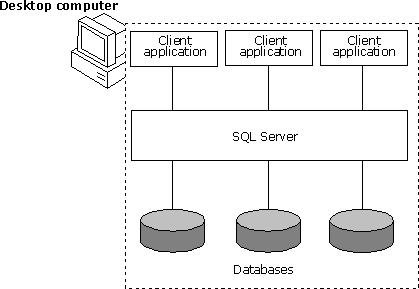
Desktop Databases

If you’re self-employed and you need to store and organize your files, then you need to plan on having a database.  The desktop database is the best option for you.  Desktop databases are less complex and inexpensive.  With the use of the desktop database, users will be able to extract, store and manipulate necessary information.  Desktop database is basically compatible for personal or desktop computers.  Some examples of desktop databases include Microsoft Access, Paradox, FileMakerPro and Lotus approach.

Desktop Database

If you’re going to use the desktop database, you will definitely benefit the following:

1.         Cost-friendly.  Most desktop databases only cost around $100.  A user can definitely purchase a desktop database like Microsoft Access by buying the Microsoft Professional Office Software.

2.         User-friendly.  Desktop databases are definitely easy to understand.  These databases are installed with easy-to-navigate graphic interface, and you’ll never need to memorize the SQL.

3.         Web Solutions.  Desktop databases will help you gain access to the World Wide Web and publish your data through the internet without any errors.

Server Databases

If you have large volume of data, you’ll need some hardcore software databases.  The server database is the best choice for you.  Some of the major server databases include Microsoft SQL server, Oracle and IBM DB2.  The server database is definitely comprehensive, and it can handle large volumes of information without breaking down.  The server database offers organization and allows users to manipulate and store data without affecting the system.

Here are the advantages of using the Server Database:

1.         Versatility.  Server database can handle just about anything.  They can handle huge amount of information with the use of their customized options or programs.  Users can utilize these programs/options to effectively extract, store and manipulate data.

2.         Powerful and durable.  Server databases can handle hard situations.  The best server databases can handle hardcore platforms if you want them to.  Modern server databases can manage high-speed platforms and processors, bandwidth connectivity and storage technology.

3.         Scalability.  This benefit definitely complements the previous one.  Server database can practically adjust to any hardware resources rapidly, and you don’t need to look for added features just to reassure compatibility.

Related Posts:

Posted in DBA | | 0 Comments

Remote DBA or Database Administration Services

September 11th, 2009 by DatabaseGuides

With database management playing an important role in the success of any business venture, it is just as important to pay attention to who’s in charge of your company’s database system.

Suffice it to say that when your database management system is not working to benefit your business, there will be hell to pay in a manner of speaking.  Deliveries may not be made on time, clients could get irate, and basically, you could lose a good amount of business for one simple reason – your database management system is chaotic.  This is why your choice of a database administrator could make a huge difference between your business moving forward and getting left behind by the competition.

Remote Database Administrator

Now that you’ve established the fact that you need the help of an expert when it comes to your database management, the next thing you should think about is where to get your database administrator or manager and what type of DBA you really want.

For most large-scale enterprises, seeking the help of a professional database administrator outside of their work pool is their first choice.  Depending on what exactly you need, a remote database administrator could just be what you need to take care of all your data, especially if you want to run it within a network of users for your company.

Remote Database

For one thing, getting the services of an RDBA or Remote Database Administrator could be more cost-effective than keeping an in-house DBA.  When you consider the benefits that you have to provide for an in-house DBA plus having the responsibility of being answerable for him or her, an RDBA really is more affordable and more effective.

Another thing is that when you have a dedicated team of experts whose sole task is to manage your database, your DBMS will be more efficient because it’s the team’s responsibility to make sure that your DBMS is working at maximum performance.

Remote Database Administrator Versus In-House DBA

Now, when you consider the pros and cons of both, you could decide that an RDBA is the way to go.  With an in-house DBA, you not only have to pay more because you pay for his or her overhead expenses as well, but you also run the risk of multi-tasking your DBA; hence, their concentration is not focused on your database management system alone but a whole other list of IT-related tasks in the office.

A dedicated team fully focused on taking care of your database management system means that they are forever watchful of what goes on with your DBSM 24/7; hence, they can troubleshoot faster and more efficiently should errors in the system occur.

With most RDBA services, you can find the perfect person for the job, depending on your requirements, especially if you undertake specific projects from time to time that need the expertise of a good DBA.

You also don’t have to worry about finding a good RDBA because, just by searching the internet, you can already get a few good companies whose expertise includes database management.

Related Posts:

Posted in DBA | | 0 Comments

Java Database

September 10th, 2009 by DatabaseGuides

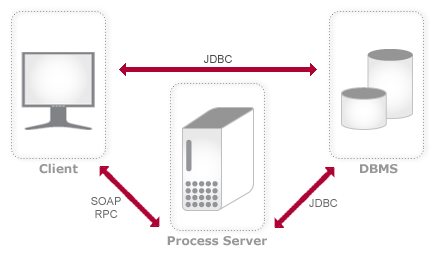
Today, java files are relatively part of the multimedia system.  We often use java programming for images, music, videos and also for large volume information.  Previously, commercial database vendors launched the new java database software which will essentially help organize java files and programs.  Java database and its applications are definitely beneficial to java programmers.  Most java databases have java managers, drivers and connectivity software for web access and database-to-database access.

Java database is used to store, extract and manipulate java programs.  With the use of the java database, java writers will potentially have less time to organize their files and access to large volume of information in only a few seconds.

What is Java and It’s Advantages?

For many years now, java has grown into extreme popularity.  It has grown into large proportions because of its programming features and capabilities.  Java is basically a programming language which can be executed in just a few seconds, and the good thing about Java is that it can be run anywhere.  Because of these unique features, Java was chosen as one of the universal end-languages for most databases.  Experts in programming would consider Java as simple, interpreted, object-oriented, distributed, secure, dynamic and portable.

Java Database

Here are the following advantages of the Java language:

1.         Java is user-friendly.  This language is definitely easy to learn, and in this event, you can easily write, compile, debug and learn about the properties/features of this language.

2.         Java is independent.  This is one of the best features of the Java language.  Java has the capability to transfer from one computer to another.  Moreover, it has the ability to run on any program, even programs from the World Wide Web.

3.         Java is the “Jack of all trades”.  The java language can basically run several tasks simultaneously within a program.  Users can definitely supply several commands and java will write it efficiently.

4.         Java is safe and secure.  Users can definitely expect that Java has security as part of its options.  You can ensure that every program, files and small-detailed information will be stored and managed in a safe and reliable environment.

Know More about Java Database

Java is a stored procedure language which relatively activates SQL’s and java programs.  Java Database can store java files, which allow users to utilize the methods and help execute the server.  The java database is composed of tables, which is also composed of rows.  Each database contains rows which define the type of record placed in each record.  The rows of the database are very important because they create the connection to carry out a command to the database.  In writing the commands, users will need to work on their SQL statements.  An SQL statement usually consists of an action, the name of the target and the parameters.  For instance, you’ll be inserting a song to the database.  This is the command you should write – “INSERT INTO SONGS VALUE (the name of the song)”.  This information is embedded in the system, and it is the user’s choice if he will set this file as exclusive or an open-source.

Since Java is definitely less complex and has a very impressive scalability, it is the most preferred language, especially for internet solutions.

Related Posts:

Posted in DBA | | 0 Comments

What is a Relational Database?

September 10th, 2009 by DatabaseGuides

Majority of our population do not have much knowledge about computer and computer-related topics, but since the world is now going through a dramatic change because of technological updates, it is important that we become inclined to learn more about the concepts of information technology, and one of the most significant parts of information technology is the concept of database.  This concept is widely used nowadays, especially in the field of business and education, but what is database and its significance to society?

What is a Database?

Whenever we talk about database, we often associate it with the compilation of data placed in a filing cabinet, and the idea of a database works in that simple way wherein a compilation of data is placed into a computer system.

To achieve the structure of a database, it would require a database model.  The most commonly used database model is the relational model.  A relational model essentially makes database management independent from other particulars.  It was developed by E.F. Codd, and the concept of the relational model was from the idea of the predicative logic as well as the set theory.

Relational Database

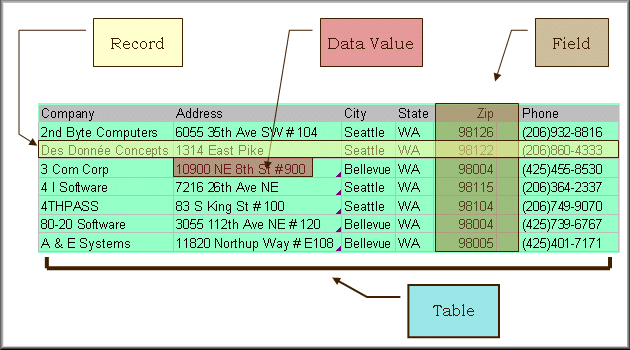
In using the relational model, you must remember to use these 3 major terms – the relations, the attributes and the domain.  The term relation refers to the table with rows and columns.  The labeled columns are called the attributes, while the term domain refers to the set of values permitted by the attributes.  That’s why whenever you’re using the relational model, you’ll be dealing with sets of tables and their relationship with each other.  For instance, you’re compiling the pertinent data of your employees.  You can develop a table with the names of your employees, and inside the table is the data on their location.  By doing such, you have created a relationship between your employee and their location.

Other models used for database is the hierarchy model and the network model.  The hierarchy model is the compilation of data in a tree-like manner.  The data are under a certain category, and they are arranged according to significance.  On the other hand, the network model is a more flexible way of representing data.

Uses of Your Database

The database is widely used and is significant in making our busy lives a whole lot easier.  Database is integrated in a wide variety of computer software, and it is commonly used by most companies precisely for the purpose of storing multi-user applications.  With the use of your database, you can have access to other users and develop effective coordination with them.

Database is also needed by ordinary people who use the computer on a daily basis.  Many people prefer this because of its sheer convenience.  People can generally use the database system on their everyday electronic mail as well as their organizers.  Computer companies also use the concept of the database to create a more efficient organization of their significant data.

Moreover, database can also be used to teach students and provide ample information for educational purposes.  Today, database is incorporated in most software drivers so that users can conveniently retrieve and manipulate certain information.

Related Posts:

Posted in DBA | | 0 Comments

What is Database Administration and Automation?

September 10th, 2009 by DatabaseGuides

Having your own website is common nowadays.  It gives one person the power to reach millions of people all around the world.  Databases are important in storing and managing data in your computer.  This is essential especially for those who want to publish content on the Internet and requires web applications.  Online businesses have grown rapidly in the past years, and the use of websites has been proven to be very convenient for both customers and merchants.  Like any other business, a websites needs to be maintained, so it’s very important to keep your site updated to remain ahead of the pack or in the same footing with your competitors.

Importance of Database

The World Wide Web is a fast-paced world where information is very important.  This makes databases important tools for web operators and owners.  Databases can be managed by database management systems.  These systems are equipped with software that control, organize, store, manage and retrieve data in a certain database.  They are also categorized according to their structures and are maintained by database administrators.  Database administrators are IT professionals who are responsible for the ongoing management of a database system.  The number of database administrators will depend on how large the database is.

Database Administration

Database administration and automation is basically the maintenance of database management systems.  These systems use software such as DB2, Microsoft, Oracle, and IBM that requires regular management.  Database administrators have many tasks to perform database management system maintenance.  The personnel that will be hired to do the job will depend on the degree of database automation.

Database Administration

In other cases, a system which requires minimal automation may have a lot of resources to manage, so one database administrator may be assigned with five to ten databases.  Database administrators have a host of responsibilities.  They are tasked to install, configure, upgrade, and evaluate server software and its related products.  They have to maintain and monitor standards, security, performance, applications, and documentation.  They have to establish backup and plan for changes and growth.  Apart from managing the database itself, they also have to coordinate with other teams to provide support, consultation and trouble shooting.  Database administration is provided by a company or a firm which assigns a team to coordinate with each other and do their jobs.

Database Automation

Database administration can be repetitive, complicated and time consuming.  Fortunately, automation solves the problem.  This does not reduce the roles of database administrators though but only enable them to focus on other important tasks.  New technologies increase the automation to reduce mundane and repetitive tasks, so database administrators are able to focus more on proactive activities.  They use native tools that come with database management system software.  All database software has corresponding tools that database administrators can use to perform their tasks.  There are also other softwares developed to manage new and existing databases along with their related products and resources.

What is Database Administration and Automation? data base automation

Like any other business, databases are also needed to be managed and maintained by highly-skilled personnel and staff who are able to solve technical problem.  However, technology continues to advance and progress, so, in time, database administration will be simpler and more efficient in the future.

Related Posts:

Posted in DBA | | 0 Comments

What is Datamining?

September 10th, 2009 by DatabaseGuides

Most often, users would need an important tool to maximize the use of the database, and there is a certain tool that can help maximize the transformation of data to information, and this tool is called “datamining”.  Datamining is used to extract the hidden information from the database.  Datamining is commonly used for businesses and security purposes.  This certainly applies to any type of data, and it can unravel certain hidden patterns within the database.  But make sure that the hidden patterns are present within the database.

For many years, developers have been searching for innovations that would help in discovering new information and ways that would make data collection more convenient.  Data comes in any form of text, numbers and facts.  Datamining is used to collect operational or transactional data (sales, cost, inventory and payroll), non-operational data (inventory sales) and metadata or the data itself like information from the data dictionary or the database itself.

The Features of Datamining

Datamining was designed to perform the following important functions.  Datamining is used to classify data.  Datamining designates the data according to predefined groups.  For instance, an email can be classified as a legal document or a spam.  Clustering, on the other hand, is also used to classify data, but these data are not according to predefined groups.  Data are huddled according to the similarity of each data.  Regression is also a function of datamining.

What is Datamining? Datamining

This tool functions by searching for the data with the most prominent defect.  The best example of regression is genetic programming.  Lastly, datamining functions as an association rule learning.  This function works by searching for the commonality of each data.  For instance, you can look for the association of the number of customers and the products they are purchasing.  Datamining can be useful for marketing purposes.  That is why this tool is also called the market basket analysis.

How to Use Datamining

There had been speculations that datamining was used to combat terrorism.  Since the rampant increase of terrorism incidences, the US government particularly became distinct in securing passenger identification as well as making sure that US passengers who travel to the Middle East will be appropriately screened.  Some of the datamining method includes Total information awareness and MATRIX (Multi-state Anti-Terrorism Information Exchange).  Although these programs definitely have a good cause, it was terminated because it was violating the 4th amendment of the US Constitution

Datamining is also used for combat games.  Mostly, these games include chess and dots-and-boxes.  Furthermore, datamining is used in certain business purposes.  Datamining is definitely significant when analyzing the company’s financial and human resources status.  This tool is used to identify the problems arising from sections of different employment groups.  With the use of datamining as well as data clustering, companies will be able to assess the client-product status, the transactions of the company’s product line, experiments and the prediction of potential profits or failures.  Moreover, datamining is significant to the field of medicine (multifactor dimensionality reduction), engineering, chemistry and education.

Related Posts:

Posted in DBA | | 0 Comments

What is a DBA or Database Administrator?

March 3rd, 2009 by Shenron

Briefly, a database is your collection or data stored in your computer. It is your organized filing system on your computer system which helps you keep track of everything and manages all your information or documents in a way that will be easy to access and manipulate every time.

Your database management system dictates just how effective or ineffective the system actually is, and it will likewise determine whether your data storage program is working for you or against you.

In order to come up with an efficient data storage system on your computer system, especially if you want the same data accessible to several computers, you will need the expertise of someone who knows how to work databases, and that is your database administrator or manager.

Database Administrator

Database Administrator Job Description

The job description of a database administrator is a long list of installing, designing, maintaining and updating the database management system you have in place. This means that they have to be always in the know about the latest upgrades in software or programs that your database system is using to make your database management system at par with the rest of the IT world.

A good database administrator should know all the workings of your database system so that, when incidents of errors occur, they can easily retrieve lost data, correct the errors, and basically put everything back to normal before the SNAFU happened.

If you are looking at creating an efficient database management system for a network of users in an office setup, you probably also have a system administrator who takes care of the networking aspect of your computer system.

If this is the case, your system manager and your database manager should work hand in hand to incorporate the database software into the network system. Therefore, a good database manager should also know how to work with a system administrator to optimize your database software or program.

A Good Database System

In a word, a good database system works to your advantage. If it has more foul-ups than you’d care to know, it’s probably high time to either change your database design or change your database manager.

A good database management system as designed and implemented by your database manager allows you to work efficiently with as little effort as possible. This means that the program is performing at the highest possible rate so you won’t experience downtimes and with as little possibility for errors as possible.

While it is very important that your database manager should be able to protect all your data to the point of restoring the program to its original form should foul-ups occur, they should also be able to provide you with the proper security to ensure that your data is safe within the network, and a sound security in place ensures that your confidential data are not open to anyone trying to access them, especially those without the authority to do so. Simply put, your database administrator can make life easier for the entire office if they know what they’re doing.

Related Posts:

Posted in DBA | | 1 Comments

Categories

Archives