English flagItalian flagKorean flagChinese (Simplified) flagPortuguese flagGerman flagFrench flagSpanish flag
Japanese flagArabic flagRussian flagGreek flagDutch flagBulgarian flagCzech flagCroat flag
Danish flagFinnish flagPolish flagRumanian flagSwedish flagNorwegian flagHebrew flagSerbian flag
Slovak flag       
By N2H

Recent Articles


Subscribe to RSS feed

What is Database Normalization?

September 10th, 2009 by DatabaseGuides

In terms of relational database design, database normalization is the process in which a database structure is free from any uncertainties like UPDATE, INSERTION and DELETION incidences.  When this happens, the integrity of the data is at stake.  That’s why, normalization was conceptualized.

To be able to normalize a certain database, it should be designed in the third normal form.  In the third normal form, all data will be secured, and only certain areas of the table are subjected to any change.  Generally, a standard database design should be fully normalized, and alterations must only be done if it is necessary.

Main Objectives of Database Normalization

The first normal form, which is developed by E.F. Codd, it has a primary objective of allowing users to perform queries and manipulation of significant information.  The first normal form must be under the universal sub-language, which is the SQL statement.  For example, users working on certain banking/credit transactions should practically analyze the data input for databases.  In cases where data are not under the first normal form, problems may arise.

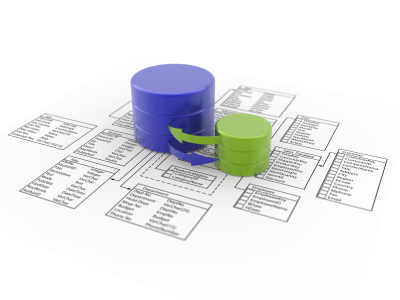
Database Normalization

Other objectives of database normalization include easy access to undesirable data that undergone unauthorized insertion, update or deletion.  Database normalization also allows less time for restructuring since new data are introduced to specific tables.  As a result, the lifespan of programs or applications are increased.  With the use of normalization, the development of relational model is in conformity with the users.  Moreover, normalization can also be effective for the collection of query statistics for further manipulation and storage.

Problems Encountered in Database Normalization

When a user modifies or normalizes its database incorrectly, the user may experience incoherence as well as inconsistency of data.  Because of this, anomalies may arise.  Here are the three major problems encountered in database normalization.

The first problem is the update anomaly.  A certain table requires ample information for this table to become effective.  Information within the table is expressed in multiple records; therefore, information may require updates.  Because of these updates, inconsistencies may occur.  For instance, you are maintaining a directory of your employees.  Your employee table will definitely include the employee’s name, identification number and address.  In cases when an employee changes his address, you may need to update your database.  If your update is not successfully done, then the table will have an inconsistent state.  Thus, the table will share an incorrect data when you ask the employee’s address.

The second problem is the insertion anomaly.  There are situations where data cannot be recorded.  In these circumstances, users should add significant data to prevent inconsistency.  For example, you will be developing an “Employee and Their Position” table.  You will need the employee’s name, ID, address, hiring data as well as position in the company.  The table will only present the files of the current employees, and thus, it cannot hold new data input.

The third and last problem is the deletion anomaly.  There are situations where you need to delete irrelevant facts from your table.  Because of normalization, you cannot delete these facts completely.

Related Posts:

Posted in Architecture | | 0 Comments

What is a Database Transaction?

June 8th, 2009 by Shenron

When we are talking about database transaction, we are referring to a work or operation done within a management system of a database against another database using an understandable and reliable approach. This operation is done on its own without relying on another program. The transactions done in a database has two uses. First, the unit of work provided by the transaction produces accurate recovery of data whenever a failure occurs. It also keeps the information within the database accurate during the failure of the system, sudden end of an execution, as well as unfinished operations in a database. Second, the database transaction isolates the database from other programs that is accessing the database at the same time. This helps prevent mistakes with the outputs.

Database Transaction

Features of Database Transaction

Most database programmers follow certain database features whenever they create one. Databases should be atomic, isolated, durable, and consistent. Transaction in a database is commonly referred to as all-or-nothing. This means that a transaction should finish totally; otherwise, there will be no effect on the database. The system should also be able to separate one transaction from another and make sure that the results of a transaction agree with the constraints in the database, and all successful transactions should be placed in a storage that will last a long time.

Most databases and data storages have certain features that allow them to manipulate the transactions within a database in order to preserve the integrity of the recorded information. Each transaction done is composed of a single or several actions that reads and writes the information into a database or data storage. It is better for you to check whether the transaction that occurred is accurate or consistent.

The recently released relational database management systems support transactional databases. Any transaction that is done in a database system may contain more than one manipulation of data either reading the data or writing it into the database or storage. Most database users consider the integrity and consistency of the data whenever they are making transactions. Most transactions done use query languages such as SQL. There are steps that are followed by these query languages, and these are – starting the transaction; carrying out a number of data queries and manipulations; if no errors are found, then transaction is ended; and of course, if an error occurs, the action is reverted to its origin and then ended.

All-or-Nothing

When no errors occur during the transaction, all the operation that happened and the result will be persisted into the database. This means that all action done within the transaction and its end result will then be stored into the database or in data storage. But, when an error happens, the transaction will then revert to its original state and end the transaction without altering anything within the database. There is no event in a database transaction where it is half done. The transaction should either be finished in its entirety or not. This is to ensure that all information within the database is accurate and consistent with one another.

Related Posts:

Posted in Architecture, General | | 0 Comments

What is a Database Migration?

June 8th, 2009 by Shenron

The internet is a fast-paced world. In a place where there are literally hundreds of other competitors, you need to keep yourself updated. To be able to do this, you need to go hand in hand with the development of technology. There’s always a new version around the corner, so it’s important to keep your system updated to keep with everybody else. Whether you are a web owner, an online merchant or an e-mogul, it’s important to keep your database updated.

Database Migration

Database Migration

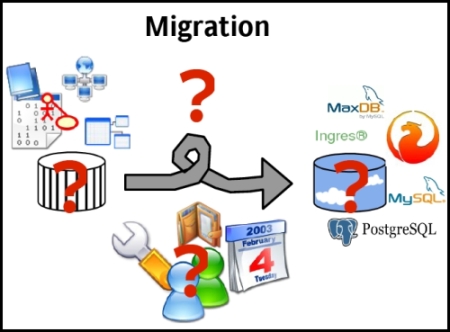
Database migration is the key in upgrading to new systems. It’s also done when an organization merges or is taken over by another. Migration is transferring and rewriting data from an old medium to the current one. This is usually done to preserve digital objects for a long time, such as reproducing newspapers into microfilm. This is also done to preserve data¸ at the same time, maintain the database.

Database migration, as its name suggests, is basically upgrading your system from an old version to a new one. It is also done to transfer data to a different and more efficient system. The data is transferred between computer systems and requires different phases – design, extraction, cleaning, loading, and verification. The data is mapped from the old system to the new. This creates a design for reading the data from the old system and writing it to the new one. The format of the old data is also related to the new system. Cleaning is done to remove obsolete information and to make sure that the data matches the new system’s requirements. After the data is loaded to the new system, it is then verified to make sure that the process was done successfully. The data should be translated accurately and completely and should support the new system’s processes.

Pros and Cons of Database Migration

Data migration is important to maintain a database, but there are also disadvantages. Technologies used to run the data may have become obsolete, which renders the migration useless. It is also time consuming and costly since migration has to be done regularly because technology changes from time to time. Plus, additional storage is also needed for every migration.

But migration is still important to maintain a database and can be efficient when done properly. More often than not, changes incorporated in the migration process are lumped together, which creates risks. The migration process should be done in steps and tested before being implemented. There are articles online which can help web owners to in migrating from old to new versions.

Due to the disadvantages of migration, alternatives such as emulation are now being developed by IT professionals. It’s the ability of a program to imitate another one. The program is called an emulator, which copies the functions of another program. But this technology is still being developed and database migration is still the key process in upgrading databases. Although the process has its setbacks, it can become a very efficient way of importing from the old to exporting to the new if done properly.

Related Posts:

Posted in Architecture, General | | 0 Comments

What is a Distributed Database?

June 8th, 2009 by Shenron

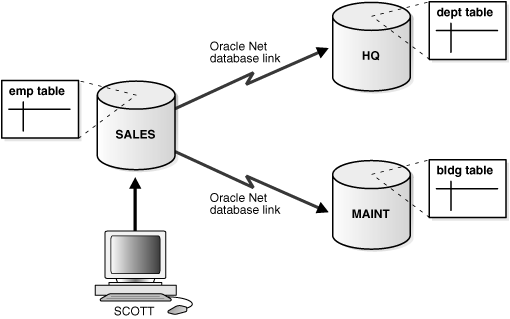
One of the exemplary models of database management systems is the distributed database. Distributed database is the database that is under the command of a central database management system in which certain storage tools are not installed in a single CPU. The distributed database is installed in multiple computers located in the same location or these computers are located in different locations but under interconnected computers. In a distributed database, data are shared through partition fragments, and these fragments can be produced. Moreover, distributed database have proven to be very significant to businesses. With the use of fragmentation and replications, users will be able to secure pertinent data without compromising other applications.

How is Distributed Database Used?

Distributed database is utilized or shared in two ways. Users can use them in local applications or in global applications. When users are utilizing local applications, the database will not require any information or data from other sites. On the other hand, users who are using the global applications will require information from other sites.

When using the distributed database, users must provide utmost care to ensure transparency of transaction and distribution. Whenever distribution across databases is used, users must have the opportunity to view and access these important data. Moreover, each transaction must have transparency across databases.

Distributed Database

Advantages and Disadvantages of Distributed Database

Distributed database have provided significant benefits to its users, but nonetheless, it also has its drawbacks that the user has to consider.

Here are the advantages of distributed database:

  1. Shows organizational structure of data. With the use of the distributed database, users will have access to database fragments, which are essentially located in one central database.
  2. Independent function. By using the distributed database, users are allowed to segregate common data and manipulate them without compromising the other applications.
  3. Great availability. The users will be allowed to manipulate other parts of the system if in case a certain portion of the system declines it. A problem in one database will not affect the entire database, but only a fragment of it.
  4. High-quality performance. With the use of the distributed database, extraction, manipulation as well as storage will definitely be more effective and more efficient. Moreover, users will have the convenience of locating and retrieving the data form the greatest part of the system. Distributed database will create the balance among data servers.
  5. Cost-efficient. By using the distributed database, users, especially businessmen, will gain more and experience the best services while, at the same time, spend less. Distributed database is cost-efficient because users can use a network of small computers with only a single database.

Here are the Disadvantages of Distributed Database:

  1. Complicated. Since the distributed database requires the transparency of data, the database management system will require extra work to strictly follow this rule. Because of the number of small computers to be maintained, the database system will need extra work and energy.
  2. Security. Since other remote sites are not centralized, data fragments are at risk for fraud. That’s why data fragments as well as remote sites should be secured appropriately.
  3. Lack of values. There are still insufficient tools available in the market to convert a central database system to a distributed database.

Related Posts:

Posted in Architecture, Performance | | 0 Comments

What is Database Integration?

June 8th, 2009 by Shenron

Today, we are now evolving into the world of more advanced technology. Many people in the line of business, education, medicine and other fields have taken on a new journey to make their jobs done more effectively and efficiently. The database is, by far, one of the best innovations made by man, but despite these advances in information technology, many users are still insatiable and would look for more ways to improve how things are usually done. That’s why database integration was conceptualized. With the use of database integration, users will have ample time for storing, extracting and manipulating data from one database application to another.

Database Integration

All about Database Integration

Database integration is the newest innovation to make filing of significant data easier. The concept of database integration implies the capacity of database software to access relational and non-relational data from one application to another. With the use of the integration of databases, users will be allowed to transfer information from one application to another faster and more efficiently. In the database management system, the access of data is in the form of query, but today, most developers use active tools, and but by using database integration, users can store data from multiple applications as well as integration across databases.

If you’re planning to use the database integration, you need to have a schema. This schema takes all the applications of the client into a single system. The result of the integration may be general or complex. In database integration, the system is controlled by a separate tool, while the changes in the database are negotiated by the database controller and the various applications used.

Because of database integration, users will not have to give extra effort and time just to access different applications. Users can instantly share files without adding an extra layer of services for applications. With the use of the database integration, all data will be synchronized.

Factors Involved in Honing Database Integration

Because database integration aims to enable users to gain access through the World Wide Web, they must have these important factors.

Database integration developers should strictly maintain integrity and quality of data. Developers use quality assurance tools to make database integration more efficient. Developers will be using authority tables and measure the level of precision of each data.

Database developers should also have flexibility, and what do you mean by flexibility? This means that database developers should have the ability to standardize and operate one application to another through the use of interchange standards. With the use of database integration, the user will have the ability to manipulate data through the integration of the database management system and other significant management tools as well as analytical, visualization and modeling tools. Database integration also allows users to utilize data structures that are compatible to current applications. Furthermore, database developers should also have the ability to modify data management through researches and management queries.

Database integration is, indeed, one of the most useful innovations provided by technology, so developers should maximize its potentials. Soon, this concept will become a part of every software application.

Related Posts:

Posted in Architecture, General | | 0 Comments

What is Database Design?

June 8th, 2009 by Shenron

In simple terms, a database is your electronic data filing system that keeps all the records of your documents and files and helps you organize them as well for future use. A database is important in that it creates an organized system of keeping all your information in a single or multiple file which you can easily access whenever you need them.

However, there’s a lot more to consider than just deciding to get a program to manage your database system for you. You database design will determine whether your database system will work for your benefit or not. Nonetheless, there’s no need to be scared of the whole prospect of getting your database organized with all this talk of database designs and programs.

Understanding how it works is really very simple, and knowing what you really need will tremendously help in determining what kind of database design is right for you.

The Right Database Design

If you’re unsure about this one, you can always get the help of a database manager to work on your data filing system. But whether you’re planning to design your own or get someone else to do it for you, it will help if you know what you’re dealing with.

In a word, your database design should meet your requirements in such a way that your work will be made easier. You can easily access it, add data, remove data and simply manipulate it without breaking a sweat.

If you’re only looking at a single file database, you may want to try designing your own database. This way, you will know how it works inside and out. If you’re familiar with spreadsheets found in your usual office applications, then you can understand how a single file database works.

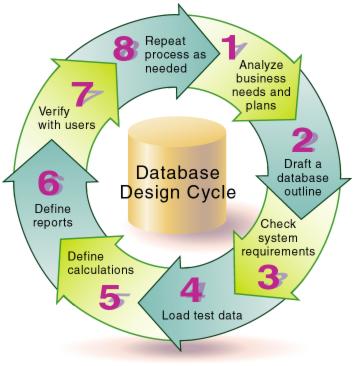
Database Design Cycle

While you may be wondering why you should opt for a database system when, in fact, a spreadsheet already works for you, a database can do more for you. A database system can work on multiple data entries with one command. This alone cuts your workload by more than fifty percent.

Keys and Values

The way your database program works is through a combination of keys and values that you will input which, when typed, will give you the exact item that you want, based on your design.

Remember that these keys and values are very crucial in the output of your database and you may not always get the exact thing that you want on the first try, so what you can do is to perform a dry-run of what you’ve designed and key-in your commands.

Usually, the programs that you get to help you organize your files for single file databases already have templates and fixed programs for the tasks at hand. However, you can still create your own design according to your specifications. This way, you can modify and improve the design until you’re fully satisfied with it. The thing to remember with databases is that, when you breakdown your data into several categories, the design almost always becomes more accurate and easier to manipulate.

Related Posts:

Posted in Architecture, General | | 0 Comments

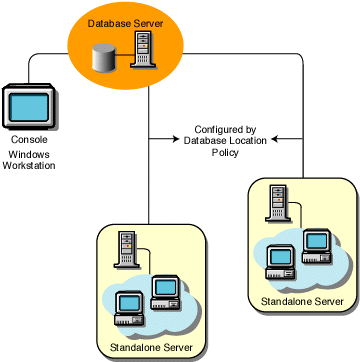
What are Database Servers?

June 8th, 2009 by Shenron

Database server is a program that connects the information stored in a database to other computers or computer programs. Most of the database management systems provide this type of function, while others count on the client-server model in order to access the database. The client-server model means that one computer, called the client, requests information from the server, which is the second computer. This is the type of model that most database servers use in order to function. There is also the master-slave model wherein the master or main servers are in a primary location, while the slave servers are considered to be the proxies.

Database Server

The Purpose of Database Servers

Database servers are usually computers that have multiprocessors as well as disk arrays for storage purposes. This is to ensure that the storage of information is stable enough to avoid any problems during accessing of information as well as storing of data. The purpose of database servers is to make the information available to all relevant users, such as in a company where most employees need to access the same information stored in the database. Database servers don’t simply act as a bridge or connection, but it also sort the information entered by the users. This is quite important since most companies transact with customers everyday. Any modifications done in the database are also read by the server, and it also stores them in its location to be available to other users. This is to facilitate the ease of updates as well as processing of information. The database server is also the one that studies the information loaded into it to be able to generate a report.

Database servers allow multiple computer programs to access the information stored inside it since the servers are the ones that handle the core or central storage. Most database servers require the right kind of hardware in order to handle multiple accessing of information. Since databases are used early on, there are now different versions available. Database servers have also evolved into servers with the ability to handle large numbers of information and with an added feature that present the gathered information to the user in various formats. Among the outputs that database servers generate are web pages. Database servers also allow inputs of orders from customers for ecommerce.

Choosing the Database Server

There are still different types of servers out in the market, and it is best for you to have the knowledge of the uses of each type. Though some of them may have similarities, still, there are differences to be found. There is the difference between database servers, server hardware and the operating system of the server.

When we say server hardware, we are talking about the physical aspect of the server, which is the computer or the machine. The operating system, on the other hand, is the interface that connects the machine to the other applications which also handles the database server. The database server, as we all know, is the one that stores the information.

All in all, a company needs all of these components to make sure that their stored information can be accessed at all times.

Related Posts:

Posted in Architecture, General | | 0 Comments

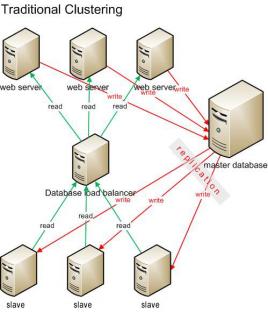
What is a Database Cluster?

May 8th, 2009 by Shenron

If it seems like you have a bunch of messy files and you have no idea about what step to take next, then you need to consider getting a database. The database will help you in storing and managing your files with the use of various commands such as SQL statements. With the use of the database, you’ll be able to organize your files according to clusters. This is called “database clustering”. How is database clustering relevant to the database management system?

The database cluster is a program in a database management system that provides users the opportunity to share or keep the files exclusive to themselves. The database cluster, particularly the SQL cluster, was developed in 2004 and was an added feature to the SQL database management system. Database cluster is designed for high-level performance, and users can ensure that this program has a linear scalability.

Database Cluster

Know the Features of a Database Cluster

A database cluster has several features that will both give you some advantages and disadvantages. The database cluster has the ability to replicate any shared data. The database cluster utilizes a synchronous replication that allows the data to be copied in multiple nodes upon writing the data. In a database cluster replication, the two copies or replicas can be stored either one at a time or at the same time. The database cluster also has the ability to store data in partitions. This is called the “horizontal data partitioning”. With the database cluster, all data will automatically be stored in several data nodes with the system. The database cluster can also be stored either in the disk or in memory. This is called “hybrid storage”. The data are then stored in memory, while the data is written in the disk asynchronously. This is because of the database cluster’s ability to replicate. In the event when all installations of hardware and software are perfectly in place, the database cluster will not need any shared disk because there are definitely no room for errors and failures.

How to Create a Database Cluster

Before doing anything, you must first create a database cluster or database storage on disk. A database cluster is a collection of databases within a database management system. After initiating the database cluster, the database will be named. For instance, the database is named Template 1. This means that this database will only be used for a created database and, thus, cannot be used for actual work. In the database system, the database cluster can be identified as the data directory, so users can definitely store data anytime, anywhere. But if you want to make a database cluster area, then here are the instructions you should specifically follow:

1. You will initially log in as a root.

2. Create a directory which will act as your database cluster area. Then you should reassign the ownership to the Postgre account, which comes with the database software. For instance, you can use this command – root# mkdir /var/lib/pgsql/data, root# chown postgres /var/lib/pgsql/data.

3. You can log on to your Postgre user account.

In order to start your database cluster, you should place the command, “initdb”. Since the database cluster includes all the files in the database, you’ll need to secure it. The initdb command will therefore restrict unauthorized persons who want to access your data.

Related Posts:

Posted in Architecture, General, High Availability | | 0 Comments

What are Database Indexes?

April 10th, 2009 by Shenron

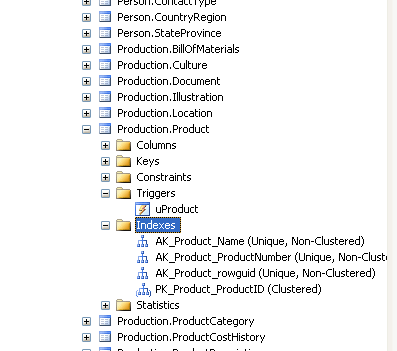
The database index is defined as a database structure whose primary function is to make the operations on a database table faster. Creating a database index requires one or a number of columns on a table for faster accessing of records in a database.

Database indexes only occupy a small part of the disk memory since they only contain important key fields and discard the other fields within the table. This way, the index can be stored even though the database holds a large number of data. Index can also be defined as either non-unique or unique, where unique index functions as a table constraint where it stops replication of rows in an index.

Database Indexes

When it comes to relational databases, the index is considered to be a part of table of the database. The power of the database index is sometimes extended by the other types of databases through creating them within functions or expressions in coding. An example of this is upper (first_name) where the index will only store entries whose first name is in the upper case. Filtered index is another option that is used in databases. The function of the filtered index is to include the data if and only if it passes a criteria designated by the administrator.

Index Example

Simply put, the index sorts data using key fields or values. Another description of a database index is that it refers to a key value in the right field of the table and is capable of retrieving data in a fast way as long as you know the right search arguments.

Using Database Indexes

To make the most out of the database index here are some tips that you can follow. First is to use a unique element in the index first. Make sure that the element that you will be using has the highest or largest value. This will help you find the page that you are looking for in a faster way. Make sure that the index that you will be creating is small. This will enable you to find pages faster, unlike having a large index. Large indexes can be used for those whose functions are of frequent use. For those who are using small tables, it is better for you not to use indexes as this will only slow down the searching process. It is better to allow the database search all of its record, rather than using indexes. Take note that database index slows down any operations done to the database. This includes deleting or adding data in the database. This is because, once you alter a record in the database, the index also needs to be updated. The index that you will be creating should be a key value that is not updated all the time. This will help your database retrieve data faster.

Types of Database Indexes

There are four types of database index, and these are bitmap index, dense index, sparse index and covering index. In bitmap index, most of the data is stored by bulk in bitmap format. Dense index is a file containing a pair of key and pointer for each record it has in a file. Sparse index is almost the same as the dense index, but it uses keys and pointers for each block in a data file.

Related Posts:

Posted in Architecture, Performance | | 0 Comments

What is a Data Dictionary?

February 21st, 2009 by Shenron

Because of the tremendous growth of multimedia applications, data can be transferred through various ways. Thus, data dictionary was conceptualized. Data dictionary is not your usually online database search engine, but this program supports the sharing of data from one country to another. Data dictionary, particularly its contents, is used to develop pdf files for data inputs on Excel templates. Data dictionary pioneered the notion on automated delivery of data from countries as well as the innovation of data delivery interface.

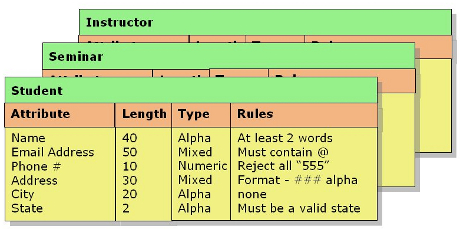
Data Dictionary

The Terms Described and Used by the Data Dictionary

The data dictionary holds or defines the datasets, tables and data elements. These three terms are defined by a group of attributes which corresponds to the ISO standards. But these attributes appears to be flexible, and change of data can readily be accessed.

The first term is the dataset. The dataset is a compilation of tables of a reported data. Oftentimes, these tables are presented in a single manner, and they are usually referred to as standalone or single databases. The dataset usually comes as a Microsoft access file or an excel file. Moreover, the dataset usually corresponds to a dataflow.

A table is simply the table seen in a dataset. The table is composed of two parts – the rows and the columns. The rows correspond to the values in the table, while the columns correspond to the data elements in the table.

The data element, which is located in the table’s columns, represents the content of the data dictionary. The two classes of data elements include the non-common element and the common element. The non-common element is situated in a certain area of the table. These elements cannot be altered or used by other tables. The non-common elements are defined within the qualifications of that certain table, and they cannot function outside that table. On the other hand, the common elements simply don’t belong to a certain table. Unlike the non-common elements, common elements can be part of other tables. They are also called harmonious elements. They are used to supplement other datasets and tables. The best example of a common element is the country code.

The Importance of the Data Dictionary

Data dictionary is essential for data reporting, data defining as well as for dataflow administrators. The data dictionary precisely provides the countries with appropriate specifications about a certain report or issue. The DD also provide excel templates for data reporters, so that data reporting will be easy. The DD also provides the criteria for the quality and validation of reported data. The data dictionary also provides the information on the country with an available point of reference for the reported data. Lastly, the data dictionary provides the perfect environment for discussion, processing and reporting of data available. Thus, users will have a glimpse on the changes for any reports or development of new ones.

The contents of the data dictionary are usually long-term, but it doesn’t mean that updates are not done regularly. The contents of the DD are usually updated depending on the available data source or the new dataflow collection.

Related Posts:

Posted in Architecture | | 2 Comments

« Previous Entries

Categories

Archives