![]() | ![]() | ![]() | ![]() | ![]() | ![]() | ![]() | ![]() |
![]() | ![]() | ![]() | ![]() | ![]() | ![]() | ![]() | ![]() |
![]() | ![]() | ![]() | ![]() | ![]() | ![]() | ![]() | ![]() |
![]() | |||||||
| By N2H | |||||||
Recent Articles
- Home
- Data Integration Software Options
- Data Integration Solutions
- Database Software Options
- Data Integration Tools
- Disaster Recovery and Business Continuity Auditing
- Disaster Recovery Best Practices
- Disaster Recovery Software Options
- Disaster Recovery Solutions
- High Availability Architecture
- High Availability Solutions
- How to Get Disaster Recovery Certification
- Remote DBA or Database Administration Services
- What is a BLOB or Binary Large Object?
- What are High Availability Clusters
- What are High Availability Servers?
- What Are Disaster Recovery Services
- What is a Data Mart?
- What is a Database Trigger?
- What is a Disaster Recovery Data Center
- What is a Disaster Recovery Plan?
- What is a DSN or Database Source Name?
- What is a Flat File Database?
- What is a Multimedia Database?
- Java Database
- What is a Relational Database?
- What is a Relational Database Management System or RDBMS?
- What is a Stored Procedure?
- What is a Sybase Database?
- What is a Transactional Database?
- What is a Web Database?
What is an Open Source Database?
September 10th, 2009 by DatabaseGuides
Open source is a kind of design where you can immediately access any kind of information from a set group with less hassle. This method has been closely studied by various companies to see whether this method can be used for their business. It has also reached technology in the form of open source database.
The term itself, open source, has been gaining popularity with the development of technology, such as computers and Internet, which allows large numbers of users to tap into their sources with more convenience. Though this kind of strategy hasn’t been popular a few years back, today, it is gaining more audience, especially since there is a rise of businesses not only in the Internet but land-based as well.
Open Source Database Benefits
Open source database is now being used by most companies since it gives them not only faster performance and more reliability but ease of maintenance as well. Open source software is available over the Internet, so it is easily accessible to more people, giving them access on how the software was programmed and allowing them to add their own codes or use it to fit their needs. By making it accessible, the software can easily be upgraded. This is quite beneficial for most since anyone can share their knowledge about the software, and any problems that may arise from it can easily be answered. Plus, more people can share tips on how to fix software bugs or enhance different programs.

One of the advantages of using open source database in companies or enterprises is the ability to departmentalize the information or data. But even though open source database has been a great help to most, there are still limitations to its capabilities, one of which is the difficulty in finding an expert who can handle this type of database. It may also be more expensive than other kinds of database systems available in the market when implemented.
Popular Open Source Databases
Since the conception of open source databases, there are numerous softwares that are now out in the market. Among the most popular are MySQL and PostgreSQl. MySQL is commonly used for websites since it is easier to use and to manipulate as well as faster than PostgreSQL. Since websites require people to log in or create an account, MySQL is the best software to store information with; plus, there are numerous users who can help you when you set up your own website. PostgreSQL, on the other hand, is considered to be more advanced than MySQL since it can handle numerous transactions all at the same time. It is also far more compliant than MySQL.
Though both MySQL and PostgreSQL have differences, both are tough, stable and available for free over the Internet. They are also easy to manipulate and are perfect for setting up either websites or commercial transactions. The security implemented for database is also included, so you are assured that all information gathered is kept strictly in confidence. Both MySQL and PostgreSQL are the top choice of those who are creating as well as implementing database that can be accessed on numerous platforms over the Internet.
Related Posts:
Posted in PostgreSQL, SQL | | 0 Comments
What is an Oracle Database?
September 10th, 2009 by DatabaseGuides
Databases are very important for web owners. They have come a long way since the early days of computing. Database systems have become more and more complicated. Although the focus nowadays have shifted from making databases to maintenance, that doesn’t mean everything has been less difficult. IT professionals nowadays are required certification by companies to make sure that they are updated. Technology has been moving in a fast pace, and the new version is always around the corner. One of the companies that make databases is the Oracle. It is one of the leading database management systems today.
The Oracle Database
The Oracle database, simply known as the Oracle, was founded in 1979 by Larry Ellison along with his co-workers Bob Miner and Ed Oates. At that time, the company was called Software Development Laboratories. In the same year, the company changed its name to Relational Software and introduced the Oracle V2. The company used a relational database system that was introduced in the 1970s. The product implemented SQL functions of queries and joins, but it didn’t support transactions. The company never released a version 1 of the product and instead started with 2 as a marketing gimmick. After three years, the company eventually changed its name to Oracle Corporation in conjunction with its flagship product. In 1983, the Oracle 3 was released, which supported commit and rollback functions with an extended platform support that included Unix environments. In the following years, the Oracle product underwent additional changes and acquired new features as new versions were released by the company.

Oracle version 4 had read-consistency; version 5 supported distributed queries with a client server model; version 6 with PL/SQL support with row level locking and backups; version 7 supported referential integrity, triggers and stored procedures; version 8 supported multimedia application and object oriented development; version 8i was incorporated with the Java virtual machine; and version 9i can read and write XML documents with an option for Real application clusters which replaced Oracle Parallel Server. The newest version which appeared in 2007 is the Oracle 11g, which supported Linux and Microsoft. Other products included releases for ERP such as Oracle E-business suite. The E-business 11i became the pioneer for integrated enterprise application software. The company products are also ported to accommodate a variety of host platforms. They also provide a number of database options for additional features, but these come with an extra cost. These options come with a license to make sure that the consumer is buying a genuine product. They also have standalone tools which are made for specific environments. This enables individuals who have no knowledge in programming run applications.
Future of Oracle Database
Oracle has come a long way since 1979. Newer versions are more focused on maintenance, since database systems are now able to cope with the different demands. Problems that appeared due to low memory capacity and expensive components are now solved. Oracle has many claims as one of the leading companies in database computing, but they are one of the leading companies in the market.
Related Posts:
Posted in SQL | | 0 Comments
What is JDBC or Java Database Connectivity?

March 4th, 2009 by Shenron
Java Database Connectivity is basically a framework that supports the programs in order to access files from databases, flat files and spreadsheets. The Java database connectivity works by making connections with the user program and transforming into a “backstage” access to the database, regardless of the type of database management system used. Moreover, Java Database Connectivity is an application program interface for Java programs that allows users to gain access on pertinent data by the use of queries. With the use of the Java Database Connectivity, the user will have the opportunity to update significant information within the database.

Java Database Connectivity is significantly a part of the Java Program. This tool is primarily used to allow multiple procedures and continue to allow these procedures to be used by the same application. With the help of the drive manager, the Java Database Connectivity will be established correctly.
How to Use the Java Database Connectivity Driver
Connecting to a database or platform will be easy with the use of the Java Database Connectivity (JDBC). Regardless of the type of database and platform, you can effectively use the Java Database Connectivity. All you need to do is assess the capacity of your database and choose the most appropriate platform you’re going to use. You can choose either oracle, Informix, Microsoft, MySQL and other platforms available in the market. Installed in these platforms are the JDBC drivers that you can use to connect and manipulate the items in the database. You can download the JDBC driver that comes with the database platform. The JDBC driver will come with instruction that you should follow specifically. Make sure that the installation is well in place, so you can activate your drive manager to gain access to the database even in a Java program.
How to Connect to the Database Using the JDBC
To gain access to your database, you need to retrieve an object of the “connection” class from your driver manager. You’ll definitely need a URL and parameters for the database and access controls respectively. These controls usually include the username or authentication as well as the password. An example of a URL in a java database – jdbc: mysql://db_server:3315/contacts/. Although a Java URL seems different than a normal URL, they’re actually the same. They have the same protocol, machine number and host name. If security is not an issue, you can probably access to databases easily. All you need to have is the authentication name, password and a database account.
In using the Java Database connection, you need to learn how to manipulate certain files. You need to learn how to structure the elements and develop query statements. Keep in mind that when you’re using the SQL statements, you can use the INSERT, DELETE and UPDATE commands, but in Java Database Connections, you should remember that they’re represented by a statement (delivered to the database every time), prepared statement (predetermined and is allowed to be executed several times) and callable statements (executes stored procedures).
Related Posts:
Posted in General, SQL | | 2 Comments
What is ODBC or Open Data Base Connectivity?
March 4th, 2009 by Shenron
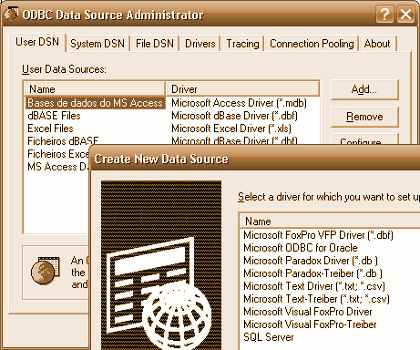
ODBC is the short term used for Open Database Connectivity. It is the interface used by programmers to be able to use databases using SQL queries. ODBC is also defined as another method of accessing information that is stored in your computers or even in your office. You can use ODBC to access the databases from Microsoft Access, Excel and dBase. In the perspective of the end-user, ODBC is the best way of accessing information stored in another database without the need of understanding how it is done. In the perspective of the programmer, ODBC is a code that can make programming easy enough so it can access other databases in other software.

The creators of ODBC, which is Microsoft and Simba Technologies, aim to make ODBC stand on its own. This simply means that the ODBC software doesn’t need other programming languages for it to function. Microsoft and Simba Technologies released ODBC in September 1992 and since then has become a part of the standard SQL that is internationally accepted. Since ODBC is now becoming accepted internationally, programmers are now making software that is ODBC compliant. This way, getting information from other databases using ODBC will be easy. Operating systems are now using ODBC such as UNIX and Apple.
Advantages of ODBC
The ODBC was created to be an interface that can access different kinds of databases by converting its codes into something that it can understand. This capability of ODBC has helped people access their databases without learning other programming languages. The advantage of using ODBC is that multiple applications can be opened not only to access the databases but also to manipulate or update them at the person’s leisure. The capability of the ODBC to recode the SQL is the reason behind its ability to access different databases. There is a setback to the ODBC. The rising number of ODBC clients uses up drivers and DLLs may lead to a system overload. Though this is only a small setback, the use of ODBC technology such as the Multi-tier ODBC server allows it to be addressed and lessen the problem. The development of newer drivers today is being questioned with its capability of handling ODBC. Since ODBC was created in the early 90s, it has a wider capability than the ones today. New drivers may still hold bugs which are now being remedied by programmers.
Using ODBC
Using ODBC requires three components, and these are the following – ODBC drivers, ODBC client and the DBMS or Database Management System Server. Examples of the DBMS servers are Microsoft Access, Excel, and Oracle. The process of ODBC starts with the ODBC client who will give a command for it to work together with the database server, but before the DBMS server receives the command, the ODBC driver will then transcribe the command to the code which the DBMS server can understand. This is how the ODBC works. The server will then give its reply back to the ODBC driver before it can reach the ODBC client.
Related Posts:
Posted in General, SQL | | 1 Comments
What is SQL or Structured Query Language?

March 4th, 2009 by Shenron
A structured query language or SQL is a database language used to retrieve information from a database management system. The SQL is considered as the standardized language for programming, extracting and managing files from the database. The SQL is standardized by both the American National Standardized Institute (ANSI) and the International Organization for Standardization (ISO). This means that many databases support the SQL. SQL allows users to extract, edit, supplement and remove data from the database. Moreover, the SQL has a call level interface, which allows the user to use the database remotely and have access to the data on the database separately. With the use of an SQL, authorized users can also manage and monitor your database.

The Purpose of Structured Query Language (SQL)
The primary purpose of a SQL is to query data in a database system. The SQL is a declarative language, which allows sets of functionality such as retrieving and deleting data from the database. However, SQL also has extensions which add to the language programming of databases. These extensions include SQL/PSM or the Structured Query Language and Persistent Storing Module, the procedural SQL, and the transact SQL.
How to Use the SQL?
The SQL is primarily used for querying. The most common operation in SQL databases includes the keyword “SELECT”. The keyword “SELECT” extracts data from a specific table in a database. Unlike any keywords used in SQL, the “SELECT” keyword does not have any significant effect on the data in the database. The use of queries in an SQL database is significant to the users because it allows the user to plan and manage the files in the database.
SQL can also be used in manipulating the data. With the use of the SQL, the user can insert, update and remove data from the database. When you use the keyword “INSERT”, you add data in a particular table. If you’re going to use the keyword “UPDATE”, you modify the values set in a table. If you use the keyword “DELETE”, this means that you remove zero or any data on the existing table. The keyword “MERGE”, on the other hand, is the combination of the command “INSERT” and “UPDATE”.
SQL is also used in transaction controls. If you’re going to use the command “COMMIT”, this will cause the data installed in the database to become permanent. On the other hand, if you’re going to use the command “ROLLBACK”, the data will return back to its original state prior to the last “COMMIT” or “ROLLBACK” command. Moreover, users can utilize the SQL in data definition, which allows users to create new tables, and data control.
The Drawbacks of Using SQL
Although SQL is the main component of making databases, this operational language has its drawbacks. The SQL is quite complicated to some users. The queries or languages used are sometimes hard to decipher and often difficult to construct. Moreover, SQL is not compatible with some vendors. That’s why SQL should be applied to compatible softwares only so users can maximize the potentials of this tool.
Related Posts:
Posted in SQL | | 2 Comments
What is a Database Query?
January 4th, 2009 by Shenron
People create a database because they want to organize the data in such a way that they can glean useful information from it. These data can be accessed by using a query. A query, if properly stated, will extract data from the database. For example, a businessman creates a database which contains the list of his products, their prices, and the number of people who bought them. If he wants to find out which products are most expensive, he can input a query into the database through the select statement, and the data he is looking for will be given to him. Likewise, if he wants to find out which products are most popular among the customers, he will have to input a different query.
The SELECT Statement
You can input a query into the database by using the SELECT statement. It extracts data from the multitude of tables and presents only those that the user is looking for. For it to work, the user must add other elements or clauses since SELECT is not a standalone statement. There are two types of clauses, the required ones and the optional ones. The required clauses are absolutely needed for the SELECT statement to work, but the optional ones only enhance its functionality. For example, the FROM clause is a clause that is ‘required’ and should therefore be included in SELECT statements. FROM is an element or a clause that is always included in every SELECT statement. IT tells the database which tables to access to answer the query. It always denotes at least one table. Other important clauses include WHERE and ORDER BY.
AND or OR
AND or OR are called operators. They are used to denote conditions that further specify which data the user is looking for. To make things clearer, let’s use an example. Let’s say that a businessman wants to find the items in his inventory that have not been sold more than three times and costs more than twenty dollars from tables 1 to 4. Of course, he will issue a SELECT statement with the FROM clause saying that tables 1 to 4 will be searched. Next he will add the WHERE clause which specifies that the conditions, price>$20 AND sales<3. So, when the results are given, those rows which did not meet the conditions specified will be omitted.
Sorting
Now, let’s say that the same businessman want to see which items are most impractical to buy. That is, he wants to find out which items in his inventory are most expensive and are least likely to be bought. He can do this by using the ORDER BY clause. By default, all the results are displayed in alphabetical order. But the user can define whether to display the data in ascending or descending order. Of course, he’ll have to specify which column to use in sorting out the items. For example, if the business man simply specifies ‘descending’, the products will simply be listed from Z-A. But if he specifies that column two will be used, then the prices will be used for sorting.
With proper use of the SELECT function, the user can make more complicated queries, thus, gleaning more information.
Related Posts:
Posted in General, SQL | | 3 Comments
Categories
- Access
- Architecture
- Backup
- Data Integration
- DBA
- DBMS
- Disaster Recovery
- General
- High Availability
- How To
- IBM
- Monitoring
- Mysql
- Performance
- PostgreSQL
- Scripts
- Security
- Services
- SQL
- SQL Server
- Training
Tech Sources