Recent Articles
- Home
- Data Integration Software Options
- Data Integration Solutions
- Database Software Options
- Data Integration Tools
- Disaster Recovery and Business Continuity Auditing
- Disaster Recovery Best Practices
- Disaster Recovery Software Options
- Disaster Recovery Solutions
- High Availability Architecture
- High Availability Solutions
- How to Get Disaster Recovery Certification
- Remote DBA or Database Administration Services
- What is a BLOB or Binary Large Object?
- What are High Availability Clusters
- What are High Availability Servers?
- What Are Disaster Recovery Services
- What is a Data Mart?
- What is a Database Trigger?
- What is a Disaster Recovery Data Center
- What is a Disaster Recovery Plan?
- What is a DSN or Database Source Name?
- What is a Flat File Database?
- What is a Multimedia Database?
- Java Database
- What is a Relational Database?
- What is a Relational Database Management System or RDBMS?
- What is a Stored Procedure?
- What is a Sybase Database?
- What is a Transactional Database?
- What is a Web Database?
What is a Database Table?
January 28th, 2009 by Shenron
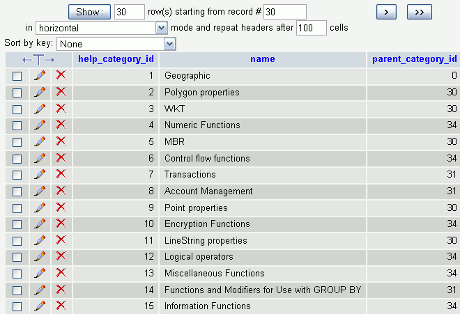
Databases are normally used to store information in a tabular form. It is almost the same as the spreadsheets found in Excel, but it is only there that their similarities end. Databases can be easily manipulated and accessed, unlike Excel’s spreadsheets. You can also link your databases with other software. Databases represent a more systematic storage since all information is arranged into tables. This way, any information stored is already placed in its own storage, thus, giving you an easy access to it. Another advantage of using a database table is that you can update the information stored by bulk and use them to cross reference with other tables easily. Using databases can be a big help, especially if you want to have your records stored and have an easy access.

Database Table
A database is composed of tables, which stores related information. Tables are much like the ones you see in spreadsheets where there are rows and columns. A database table has a set number of columns, but it can have multiple rows. They are also used to better organize your records through the use of same characteristics and such. The database that you will use can have multiple tables. In order for the database to know which table it is supposed to access, it uses the primary key. A primary key can be one or more than one column. This way, once you want to input information or access one, all you need to do is type the primary key, and all the tables under it will appear. Some databases have their own unique primary key once you create a database just like the one found in Microsoft Access, although sometimes, it is considered to be a disadvantage rather than an advantage.
Tables may contain meta-information like constraints as well as values that may be included within columns. There are different kinds of databases that you may use. There is the relational database, flat file database, hierarchical database, and network database. All of these types have their own tables that hold information.
Why Use Database Tables?
Companies that have a large number of employees can use a database to store their records. Using the database table, columns can contain the employee ID, last name, first name, and middle name of the employee, while the rows are the ones that will hold the names of the employees of the company. Once you want to access a particular employee record, you can simply type in the primary key, and the record will immediately appear. Database tables are easy to create and manipulate. One of its features is its retrieval of records, which is far faster than other spreadsheets. A database needs to be able to hold a large number of information with the capability of fast retrieval before it can be considered to be an effective database. Once you have a general idea of spreadsheets, you wouldn’t have any trouble in using databases since they are almost the same. Remember that database tables are the ones that hold the information, and the information isn’t required to be physically stored in the computer holding the database.
Related Posts:
Posted in Architecture | | 2 Comments
What are Database Models?
January 14th, 2009 by Shenron
Database models, also known as database schemas, shows the structure of the database or its format which is handled by the database management systems or DBMS. These schemas are stored in a dictionary of data and usually refer to the representation of data in a graphical format.
Database Models
A database model is also referred to as a theory of how a database is supposed to look like. There are numerous types of database models today and these are hierarchical model, network model, relational model, entity-relationship, object-relational model, and object model. These models not only represent how a database looks like but also what kind of operations that can be used to manipulate the data within. An example of operations that can be used in a relational model is select, join, and project. These operations may not be considered explicit in some query languages, but they are considered to be the stepping stone for the development of query languages. Word processors, mail mergers and information management systems are only some examples of what a database is.
Database models are usually the basis of a database structure so different techniques are applied into it. Database systems are normally centered on one type of database models, but it is not unheard of that some database structures can support different kinds of models. Products using databases give its users the right to fine tune its performance depending on their needs since this allows the product to be fully functional. This is why some databases can be used in other product or software.
Types of Database Models
The flat model is composed of two dimensional arrays where the members of a column are assumed to have the same values, while the values found in the rows are considered to be relational to one another. The flat model, however, may not be considered as a database model based on its definition.
Hierarchical model presents data in a tree-like structure. This model has an upward link that shows the hierarchy of the data stored. The upward link represents the nesting of data as well as the sorting field for each level. This type of model was frequently used during the early years of the database management system mainframes. The hierarchical model can be used not only in databases but also in real life such as in table of contents, recipes and the like. Though hierarchical model is commonly used, it still has limitations. One such limitation is its inability to represent the redundancy found in a data.
The network model uses records and sets, which are its two basic structures, when organizing data. Record contains the fields, while the set is the one defining the relationship existing between the records. The network model is considered to be a variant of the hierarchical model since it also has the same branching out of nodes. The only difference is that, in the network model, these nodes can be connected to one another, unlike the ones in the hierarchical model. The network model also has the capability of representing data redundancy.
Related Posts:
Posted in Architecture | | 0 Comments
Database Architecture
January 10th, 2009 by Shenron
Every structure needs to be built for soundness and efficiency, which is why we hire professional architects to design the building. Without an architect, the structures would be disorganized, unstable, and inefficient. This principle holds true with our databases, which are structures in their own right, structures of data. Database architecture describes exactly how data flows in a system – its storage, its groups, its qualities, and all its other aspects, and it keeps the data in such a way that retrieval will always be easy and quick. It also describes the data’s nature and its structure. Database architecture describes exactly how the different aspects of a database relate to each other and how they are organized.
How Does It Work?
Different people design how their database is organized in different ways. Some people might want to make one large database which contains everything they need, or they might want to create several databases which are grouped according to their function. To make this concept more understandable, let me give you an example. Let’s say that one manufacturing company is making its database. For clarity, it could choose to keep their databases separate, or it could have one database for its products and another database for its employees or its payroll. And how these two are integrated into the company’s system is what database architecture is all about. It describes all the components or the objects in the database and how they relate to each other and also how they are organized. If the components are properly organized, then data retrieval will be very easy to facilitate. So, if the database architecture is good and properly structured, then everything will run smoothly.
The common types of database architecture include Object-oriented, hierarchical, relational, and networked. However, most people are content to use flat file, especially if the operations involved are not too complex and if the volume of the data being stored is just small. Those who are not experts in matters of databases will also be more comfortable using flat files. But flat files do have their disadvantages. When the operations that will be performed in the database are complex, simple database architectures won’t work well. This is when one must hire a professional database architect.
Database Architects
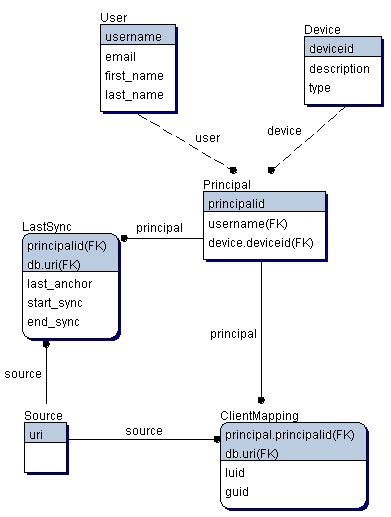
Basically, people hire a database architect to design the database, much like how a person hires a typical architect to design a building. They’re very popular these days, and quite a lot of them make a living out of designing the structure of databases. Database architects build the diagrams for the relationship of the data stored in your database. They design the program in such a way that adding new tables would be easily facilitated. Much like how an actual architect takes care of a building’s safety, database architects are the ones in charge of debugging the model, so that when it is put into actual use, there won’t be any glitches.
The problem with database architecture is that one design doesn’t fit all your problems. Usually, people need to create a new design that fit their needs specifically.
Related Posts:
Posted in Architecture | | 0 Comments
What is a Database Schema?
December 28th, 2008 by Shenron
Database schema refers to the layout of the database, which shows how each data is organized into structures or tables. It is also referred to as the language used by database management systems. The schema in a relational database refers to the tables, fields and also the existing relationship between the fields and tables. Schemas are stored in a data dictionary, and although it is usually in database language, it is considered as the graphic model of a database. Simply put, it is the representation of the database. Data dictionary, on the other hand, is the storage for the data input by various users. It can handle large quantities of information from multiple sources.
Understanding Database Schema
Another definition of a database schema is that it refers to the characteristics of an input. An example is the number of characters in a string for a field name or password, and this is considered a database schema. This includes the kind of characters allowed for the field name or password. It also talks about the relationship between the tables that are within a certain database. Schema is the term used when talking about the existing templates, such as the strings or characters that are required when adding information.
Database schema is also known as a repository of tables that are already defined along with their relationship with one another. Large numbers of object-oriented classes can be seen in a schema. Data types, assertions, and procedures that are stored can be included in a schema.
Levels of Database Schema and Its Functions
Database is simple enough to understand. The creation of it is another matter. There are different levels of a database schema that is required in creating a database. Each level represents different functions, and these are the conceptual schema, logical schema, and physical schema. Conceptual schema shows the concepts of the information placed in tables as well as their relationships. This usually talks about the semantics of a group. Conceptual schema refers to important matters related to the group or organization, its characteristics as well as their association with one another which is considered to be significant. The conceptual schema also allows a database to inherit a characteristic from another database. The meaning of inheritance leans more on object oriented terminology.
Logical schema, on the other hand, refers to the model of the data that talk about a specific problem in a domain that is a part of a database. It also refers to tables and columns that are in relation to one another, XML tags and classes that are object-oriented.
There is still a difference between the conceptual and physical schema. Once the logical schema is done, the next step, which is also the last step in creating a database, is the physical schema.
Physical schema refers to the storage of data into disk drives that can be used in a company whose computers are all in a network which is located within one place and yet still connected to another company in another area. Physical schema simply refers to how a series of networked computers are related to another network, which may be found in another area or possibly in another country.
Related Posts:
Posted in Architecture | | 2 Comments
Next Entries »Categories
- Access
- Architecture
- Backup
- Data Integration
- DBA
- DBMS
- Disaster Recovery
- General
- High Availability
- How To
- IBM
- Monitoring
- Mysql
- Performance
- PostgreSQL
- Scripts
- Security
- Services
- SQL
- SQL Server
- Training
Tech Sources